
Free Online Invoice generator automating billing workflows

Billing is one of the day-to-day operational tasks for businesses, organizations and individuals across all industries. With Tuma Invoice generator, you can automate billing cycle from designing invoice to tracking payment status and sending automated reminders to clients.
Steps
Onboarding
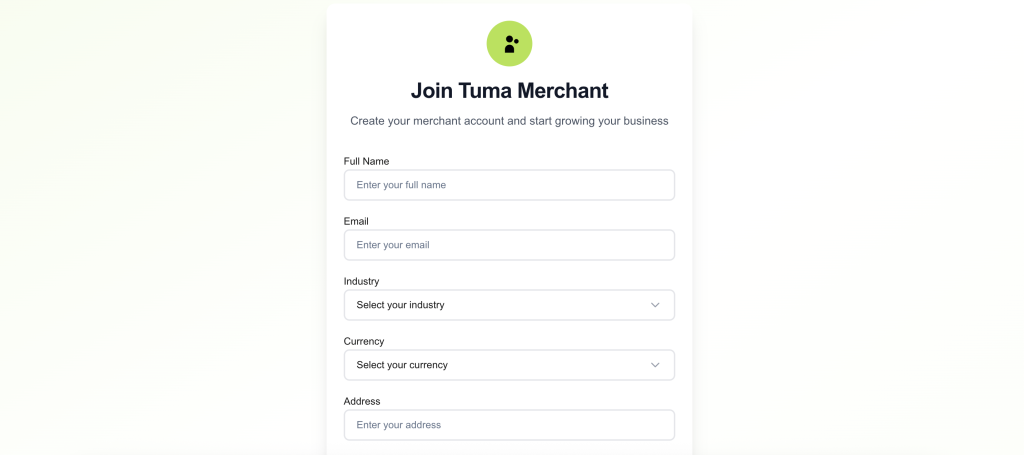
1) Sign up here: https://merchant.tuma.co.ke
2) Fill all fields. NB: Enter full name as it appears in your National ID
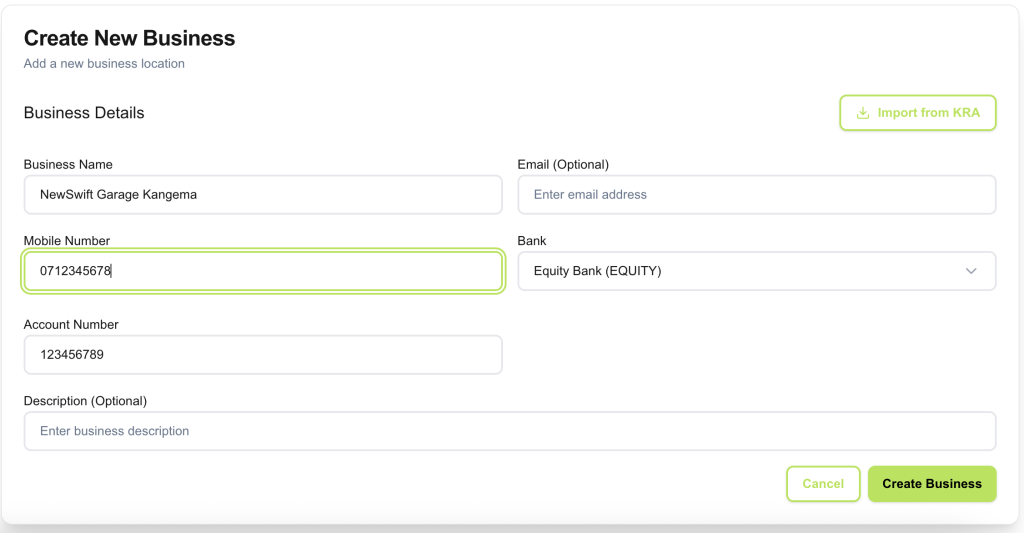
3) Create your business name and configure bank details. Select Equity Bank and enter your account number, then click ‘create business‘.
NB: For API access, you must provide an email address for the business profile. It can still be your personal email address but it’s required for API access. The email field is only optional for portal use cases. Also, to enable tracking of payment status, you need to input correct banking details.
Web use case
Go to invoices section the click new invoice, fill billing details and click create invoice.

API Invoice Generator
For users with advanced use cases, you can programatically generate an invoice with an API call. Go to Developer section, generate API keys as follows:

Generate API access token
Authentication
POST https://api.tuma.co.ke/auth/token
Content-Type: application/json
{
  "email": "[email protected]",
  "api_key": "tuma_ec7d6eab48c4432ab0f144c7b7fc1b4819_1759998878"
}
Response
{
  "success": true,
  "message": "Authentication successful",
  "data": {
    "token": "eyJhbGciOiJIUzI1NiIsInRCJ9.eyJzaG9wX2lkIjoiNzg3ZTI0NGQtOTRhOC00ODgxLWJjNzctNDc2ZGZkNjA3ZGJlIiwidXNlcl9pZCI6ImQyYTY5NWVkLTg1MWUtNGZiYy1iOTUiIsImVtYWlsIjoic2hhZHJhY2subWF0YXRhQGljbG91ZC5jb20iLCJpcHJzX2FjY2VzcyI6ZCI6MTc2MzU0MjY2NywiZXhwIjoxNzYzNjI5MDY3fQ.3FHTZ9ENc_C-C8-AvQEXroIeNYD5Ncv5eEhB4WpEKaY",
    "shop": {
      "id": "787e244d-94a8-4881-bc77-476dfd607dbe",
      "name": "Tuma Limited",
      "email": "[email protected]"
    }
  }
}
Generating Invoices
You can now use the bearer access token to generate or manage invoices.
POST https://api.tuma.co.ke/invoices
Authorization: Bearer your-jwt-token
Content-Type: application/json
{
  "customer_name": "Jane Doe",
  "customer_email": "[email protected]",
  "customer_phone": "254712345678",
  "customer_address": "123 Main St, Nairobi",
  "items": [
    {
      "item_name": "Custom Consulting Service",
      "item_description": "Strategic business consulting for Q1 2024",
      "quantity": 1,
      "unit_price": 5000.00
    },
    {
      "name": "Website Maintenance",
      "description": "Monthly website maintenance and updates",
      "quantity": 3,
      "price": 1500.00
    }
  ],
  "tax_rate": 16,
  "discount_amount": 200.00,
  "due_date": "2024-02-01",
  "notes": "Payment terms: Net 30 days",
  "currency": "KES"
}
Response
{
  "success": true,
  "message": "Invoice created successfully",
  "data": {
    "invoice": {
      "id": "c3d4e5f6-g7h8-9012-cdef-g34567890123",
      "invoice_number": "INV-123456789",
      "customer_name": "Jane Doe",
      "customer_email": "[email protected]",
      "customer_phone": "254712345678",
      "customer_address": "123 Main St, Nairobi",
      "subtotal": 5000.00,
      "tax_rate": 16.00,
      "tax_amount": 800.00,
      "discount_amount": 200.00,
      "total_amount": 5600.00,
      "currency": "KES",
      "status": "pending",
      "payment_status": "pending",
      "due_date": "2024-02-01",
      "notes": "Payment terms: Net 30 days",
      "created_at": "2024-01-01T12:00:00Z",
      "public_url": "https://merchant.tuma.co.ke/invoice/c3d4e5f6-g7h8-9012-cdef-g34567890123",
      "access_code": "123456",
      "items": [
        {
          "id": "d4e5f6g7-h8i9-0123-defg-h45678901234",
          "product_id": "f47ac10b-58cc-4372-a567-0e02b2c3d479",
          "product_name": "Sample Product",
          "item_name": "Custom Service",
          "item_description": "Custom service description",
          "quantity": 1,
          "unit_price": 5000.00,
          "total_price": 5000.00
        }
      ]
    }
  }
}
Listing invoices
You can fetch invoices with an api call as follows:
GET https://api.tuma.co.ke/invoices
Authorization: Bearer your-jwt-token
Notifications
Immediately an Invoice is generated either by API call or web client(portal), Tuma sends the invoice to the customer email address and it will send a status update to merchant once a payment has been made. It also updates the payment in the merchant portal for real-time payment reconciliation.
