
Skip to content
Tuma Solutions logoTuma Solutions logo
  • Features
  • Integrations
  • Tuma Pricing
  • Guide
  • FAQs
  • API Docs
  • Disclaimer
  • Support
Start
API, Business, Software

Zoho Books Integration with local banks, MPESA, Airtel Money, Saccos made easier
October 16, 2026 Tuma Payments Comments Off on Zoho Books Integration with local banks, MPESA, Airtel Money, Saccos made easier
Integrating Zoho Books acocunting sales, invoices with MPESA and Bank

For MSMEs, reconciling payments from mobile money and bank transfers against every order/sale in Zoho is the hardest part for every merchant’s day-day operation. Tuma Payments Zoho Connector plugin solves this by automating payments reconciliation in two clicks by simply granting Tuma access to your Zoho Books acocunt.

Prerequisites

To connect your MPESA Till number, Paybill or local bank account with Zoho Books for automated payments reconciliation, you need to have the following in advance:

1) Active Bank/Sacco account in Kenya or MPESA Buy Goods till number or MPESA/Airtel Money Paybill number

2) Verified Tuma account or create one here: https://merchant.tuma.co.ke/register

3) Zoho Books subscription or sign up here

Steps

1) Create a business profile in your Tuma merchant acccount under Businesses > new. Enter business details and more importantly, bank details
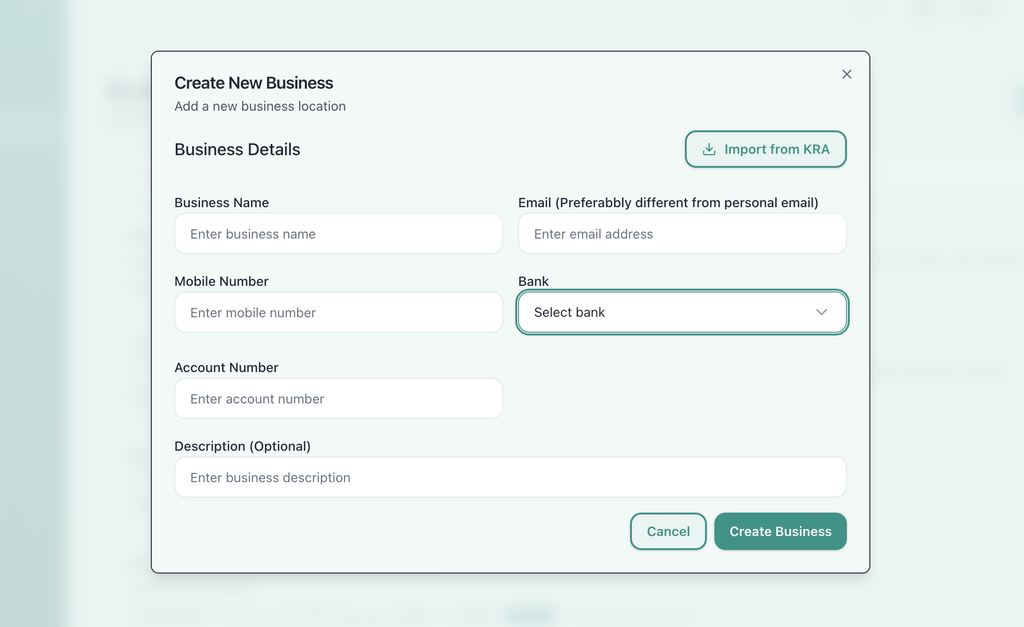
Integrating MPESA, local banks with Zoho books

Note: For MPESA Buy Goods, select “inhouse MPESA Business(buygoods)” and for Paybill, select “inhouse MPESA Business(PAYBILL)” Kindly note that this applies to yill/paybill numbers registered by Safaricom under your business name, not bank issued paybills like 247247 for Equity, 522533 for KCB etc. If you have such, select the actual bank name and leave paybill option.

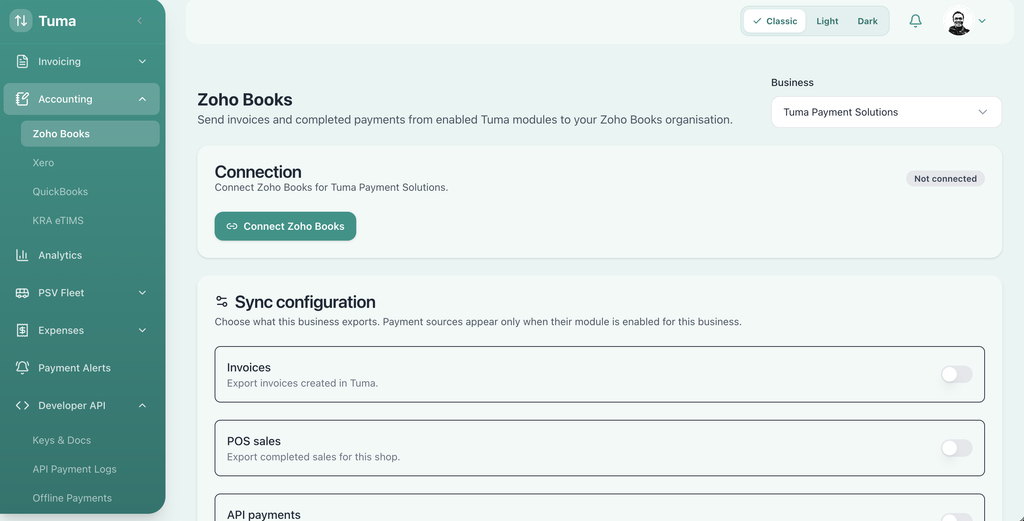
2) Navigate to Accounting > Zoho Books > Business account then click “Connect Zoho Books.”

Connecting Zoho Books with MPESA and local banks

This redirects to Zoho Books asking to grant Tuma Payments access to the following privileges:

  • READ View and manage Settings and Preferences.
  • CREATE View and manage Invoices.
  • READ View and manage Invoices.
  • CREATE View and manage Customer Payments.
  • READ View and manage Accounts.
  • READ View and manage Customers and Vendors.
  • CREATE View and manage Customers and Vendors.

With this, Tuma is able to automatically create and update invoices, sales etc in Zoho Books when payments are made/received via MPESA, local banks and any other digital payment channel in real-time.

3) Click “I allow Tuma Payments to access the above data from my Zoho account.” then Accept
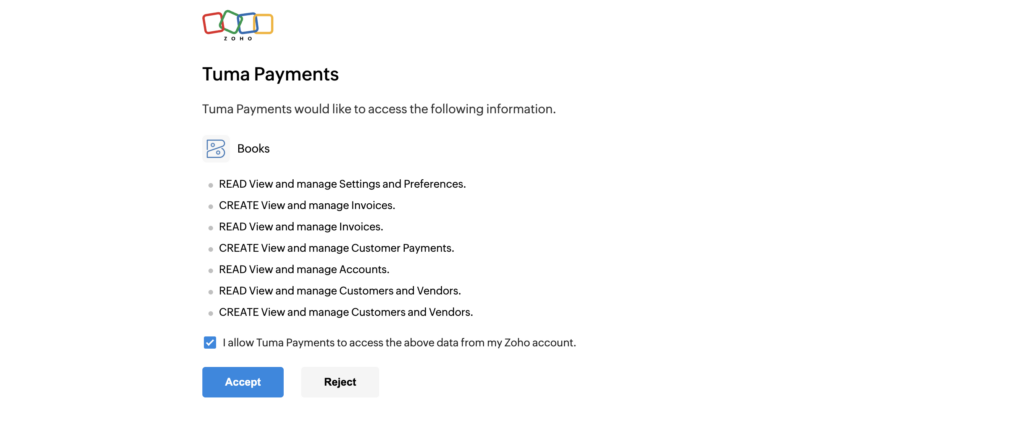
Zoho books integration with mpesa and Kenyan banks

This redirects back to Tuma merchant portal where you can now select which transactions Tuma should post in Zoho Bookings including POS Sales, Invoices, offline payments, API payments, bank transfers, STK push etc. These available options depend on the modules that a business account has access to on Tuma Platform. If a user doesn’t use inbuilt Tuma tools, simply select API payments.
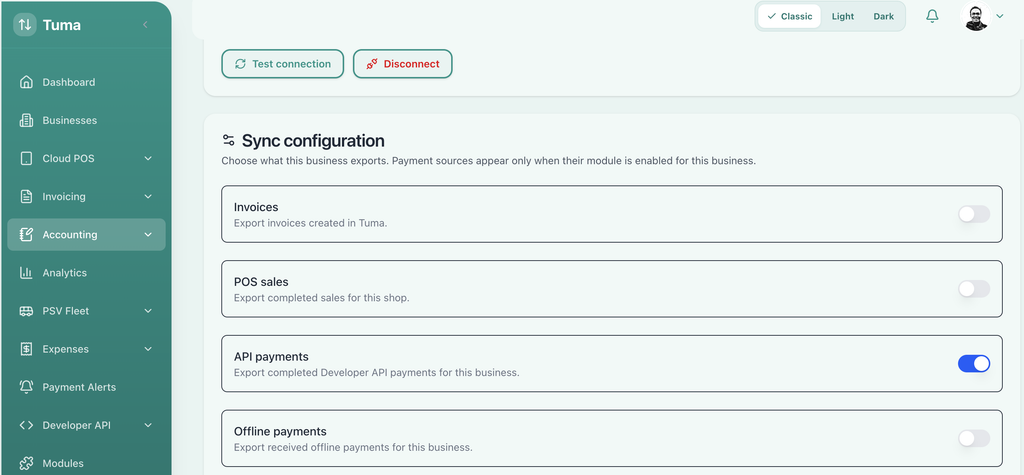
Payment sources for Zoho Books mpesa bank integration

4) Select default customer name for walks as well as preferred Zoho Bank account and click save configurations
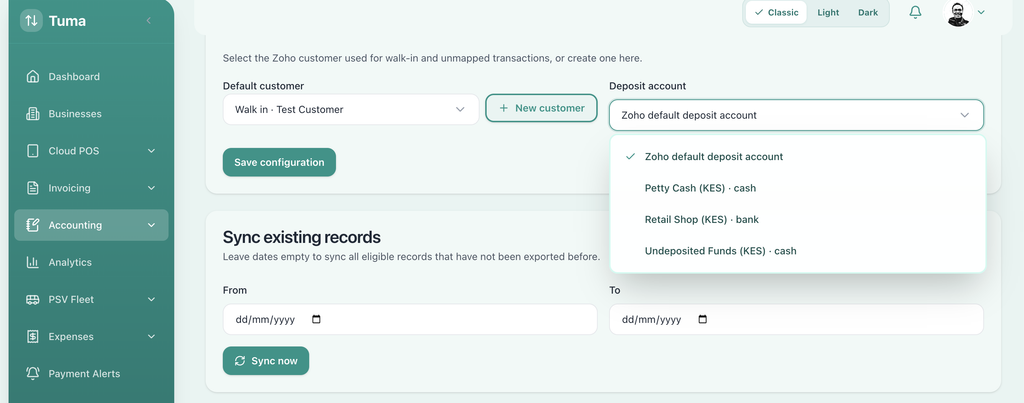
Tuma payments  zoho books connector

5) For every payment made through the sources enabled above, the sale/payment details will instantly be posted on Zoho Books.
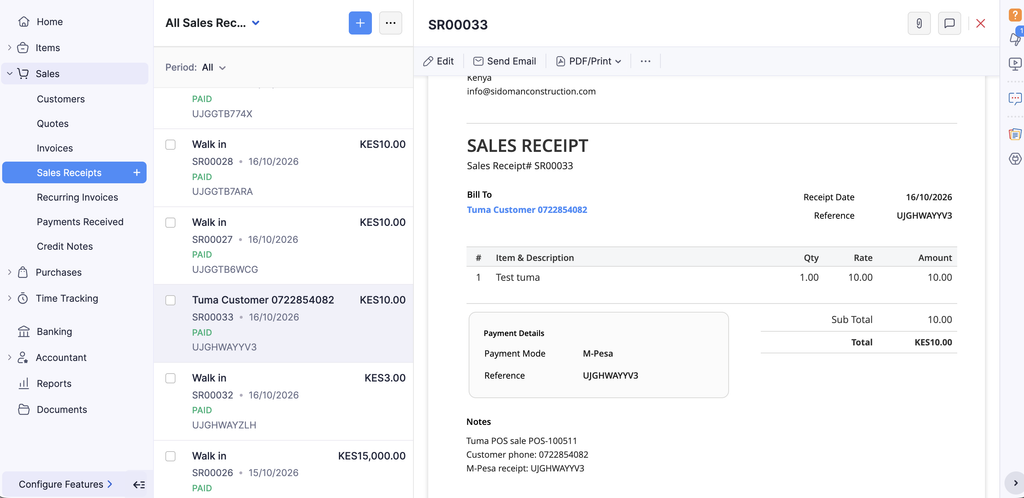
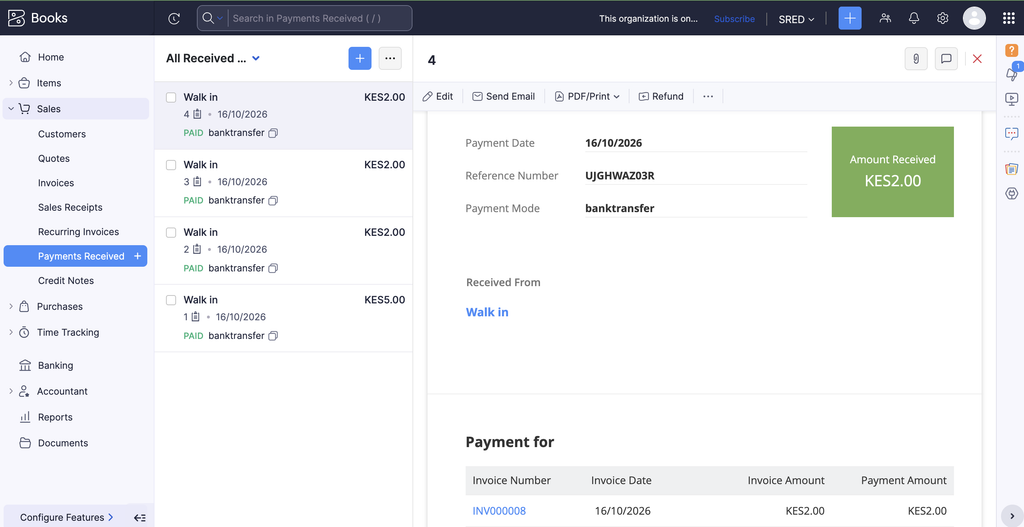
Zoho Books MPESA, bank integrations
Zoho nvoices integration with bank and MPESA
Tuma Payments

Tuma is a powerful payment gateway that automates billing workflows by connecting invoices, apps and sales with M-PESA and all banks in Kenya.

Post navigation

Previous

Search

Categories

  • API 31
  • Business 32
  • Compliance 3
  • Fintech 48
  • Guides 35
  • Info 25
  • Software 2
  • Tax 1

Recent posts

  • Integrating Zoho Books acocunting sales, invoices with MPESA and Bank
    Zoho Books Integration with local banks, MPESA, Airtel Money, Saccos made easier
  • how to go live on tuma payments gateway
    How to go live on Tuma Payments integration
  • Extending MPESA and Bank payment alerts to Slack channels
    How to extend MPESA and Bank Payment alerts to Slack channels

Tags

Bank of Africa branch codes Bank of Africa swift code BOA branches BOA headquaters BOA Swift code Business Central Integrationn with Banks in Kenya Business central Integration with Airtel Money Business Central integration with KCB Business Central integration with MPESA Daraja API error 1037 solution Doctor appointment app with bank integrations Doctor appointment app with mpesa integration invoicing software in kenya with payment integration Kenya Post Office Savings Bank Mediacal appointment management system with payment integrations Microsoft Dynamics 365 integration with banks in Kenya Microsoft Dynamics 365 integration with Equity Bank Microsoft Dynamics 365 integration with mobile money Microsoft Dynamics 365 MPESA integration MPESA API error code 1037 MPESA API error code 2001 MPESA API error codes OSPOS MPESA POS Airtel Money POS MPESA Post bank branch codes Post bank branches Post Bank office branches Post bank swift code POS with automated payment reconciliation POS with DTB integration POS with Equity Bank integration POS with I&M Bank Integration POS with KCB integration POS with NCBA integration SBM bank branch codes SBM Bank Kenya branches SBM Swift Code Sidian Bank branch codes Sidian bank branches Sidian Bank Swift Code STK push error codes Zoho books access scopes Zoho Books API tutorial Zoho Books integration with MPESA

Related posts

How to integrate MPESA and Kenyan banks with Zoho books
API, Business, Guides

How to integrate MPESA and Kenyan banks payment collections with Zoho books

February 23, 2026 Tuma Payments Comments Off on How to integrate MPESA and Kenyan banks payment collections with Zoho books

Tuma Payment Gateway offers a Robust API that automatically syncs all cashless payments made through mobile money services with Zoho Books. This works with M-PESA paybills, Buy Goods till numbers or any bank account in Kenya

Intelligent Billing and Payments Reconciliation Automation Infrastructure for Small and Medium-sized Enterprises

Quick links
  • About
  • Payment channels
  • Integrations
  • Support
Resources
  • Uptime/status
  • API Docs
  • Tuma for SaaS
  • Partnerships
Get in touch
  • Email: [email protected]
  • Tel: +254782411538

© Tuma Payment Solutions. All Rights Reserved.

  • Terms & Conditions