How to integrate MPESA and Kenyan banks payment collections with Zoho books

Supported channels
Tuma Payment Gateway offers a Robust API that automatically syncs all cashless payments made through mobile money services with Zoho Books. This works with M-PESA paybills, Buy Goods till numbers or any bank account in Kenya, that is:
- M-PESA Paybill number / Buy Goods Till Number
- Equity Bank
- Kenya Coomercial Bank(KCB)
- Cooperative Bank of Kenya
- Diamond Trust Bank
- NCBA
- Loop
- Family Bank
- Stanbic Bank
- I&M bank
- KWFT
- Faulu Bank
- Access Bank
- Standard Chartered Bank
- ABSA
- SBM Bank Kenya
- National Bank
- Sidian Bank etc
Steps
1) Sign up on Tuma, create a business profile and generate API keys: refer to this link
The onboarding procedure is the same regardless of your bank.
2) Login to Zoho API Console https://api-console.zoho.com/add
Click add client, select “self client“
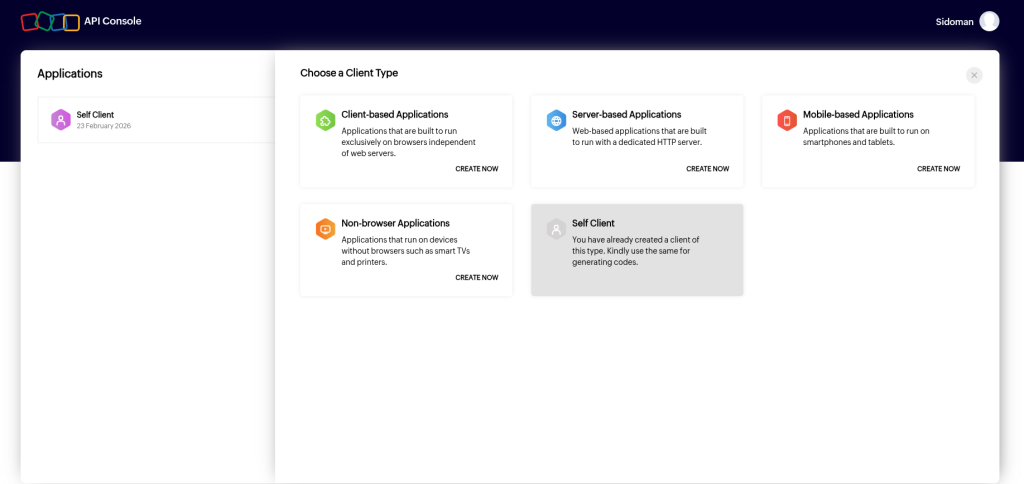
3) Add access scopes and generate code.
Add access scopes: ZohoBooks.fullaccess.READ,ZohoBooks.fullaccess.CREATE,ZohoBooks.fullaccess.UPDATE,ZohoBooks.fullaccess.DELETE
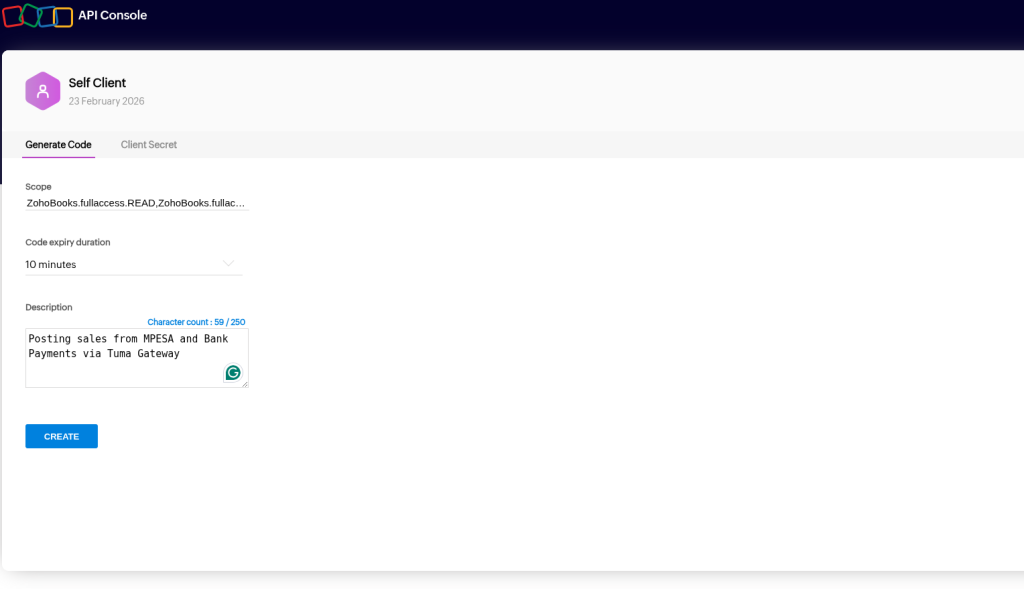
NOTE: Copy the generated Grant Token. Immediately exchange it for a Refresh Token using this one-time CURL command (Grant tokens expire in 1-10 minutes)
Request
curl -X POST "https://accounts.zoho.com/oauth/v2/token" \
-d "code={YOUR_GRANT_TOKEN}" \
-d "client_id={YOUR_CLIENT_ID}" \
-d "client_secret={YOUR_CLIENT_SECRET}" \
-d "grant_type=authorization_code"
Response
{"access_token":"1050.5a2f3ff9cy745teu6538hwnb44b.hfyeuisshf54ac0b35911de220e1c7cc","refresh_token":"1300.0i972b4adf5464748u3f41.f8i4ye6wg546gehab5","scope":"ZohoBooks.fullaccess.CREATE ZohoBooks.fullaccess.READ ZohoBooks.fullaccess.UPDATE","api_domain":"https://www.zohoapis.com","token_type":"Bearer","expires_in":3600}Save the refresh_token from the response.
Important
- Access Tokens expire in 1 hour: You should ideally cache the access token in a file or database and only request a new one when it expires to stay within API limits.
- Datacenters: If your Zoho account is on the EU server, change the URLs to
accounts.zoho.euandzohoapis.eu. - Headers: Zoho specifically requires the
Zoho-oauthtokenprefix in the Authorization header.
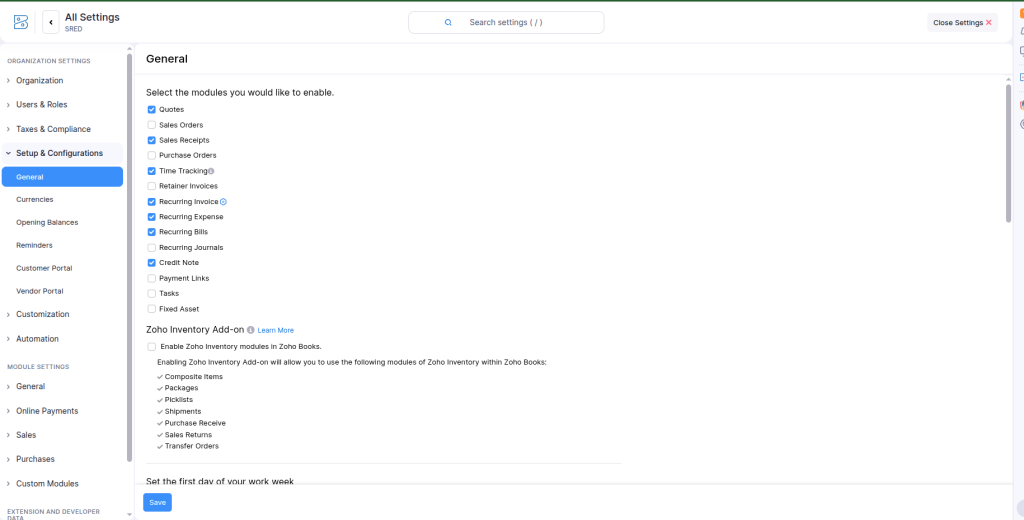
4) Go to your Zoho Books, add bank account and enable sales receipt module
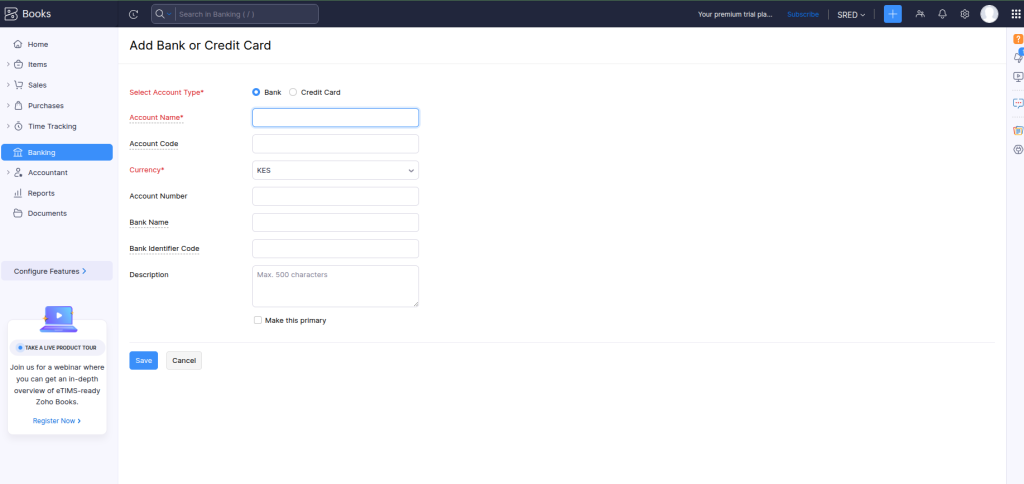
Enable Sales receipts and save
5) Create a walk-in customer in Sales > Customers
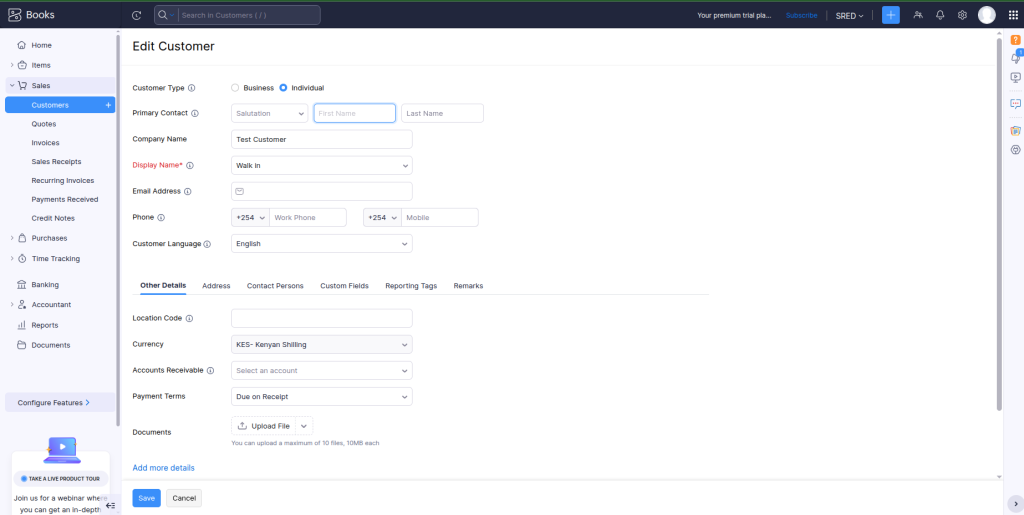
6) Initiate payment prompt from Tuma API
Authentication
Endpoint : https://api.tuma.co.ke/auth/token
Method: POST
Content-Type: application/json
Payload
{
  "email": "[email protected]",
  "api_key": "your_company_tuma_api_key"
}
Response
{
  "success": true,
  "message": "Authentication successful",
  "data": {
    "token": "eyJhbGciOiJIUzI1NiIsInRCJ9.eyJzaG9wX2lkIjoiNzg3ZTI0NGQtOTRhOC00ODgxLWJjNzctNDc2ZGZkNjA3ZGJlIiwidXNlcl9pZCI6ImQyYTY5NWVkLTg1MWUtNGZiYy1iOTUiIsImVtYWlsIjoic2hhZHJhY2subWF0YXRhQGljbG91ZC5jb20iLCJpcHJzX2FjY2VzcyI6ZCI6MTc2MzU0MjY2NywiZXhwIjoxNzYzNjI5MDY3fQ.3FHTZ9ENc_C-C8-AvQEXroIeNYD5Ncv5eEhB4WpEKaY",
    "shop": {
      "id": "787e244d-94a8-4881-bc77-476dfd607dbe",
      "name": "Your Company Name",
      "email": "[email protected]"
    }
  }
}
Initiating Payment Request
With the access token you can now initiate payment request via STK push prompt for any mobile payment network.
POST https://api.tuma.co.ke/payment/stk-push
Authorization: Bearer your-jwt-token
Content-Type: application/json

{
  "amount": 100.00,
  "phone": "254712345678",
  "callback_url": "https://your-app.com/callback",
  "description": "Payment for order #123"
}

Response:
{
    "success": true,
    "message": "Payment request sent successfully. Complete payment on your phone.",
    "data": {
        "merchant_request_id": "2dfd-472d-9bbd-df490884098d625543",
        "checkout_request_id": "ws_CO_04032026165157497729598795",
        "customer_message": "Success. Request accepted for processing"
    }
}
Callback handling and posting to Zoho Books
Your callback URL provided in STK PUSH request will receive payment status updates as shown below.
POST https://your-app.com/callback
Content-Type: application/json

//Response model for success, result_code=0, else it's a fail

{
  "status": "completed",
  "merchant_request_id": "a5ea-442f-a424-f94158490a468325",
  "checkout_request_id": "ws_CO_23022026142735114729500095",
  "result_code": 0,
  "result_desc": "The service request is processed successfully.",
  "timestamp": "2026-02-23 14:27:46",
  "mpesa_receipt_number": "UBNGT7QNYB",
  "amount": 10
}

//fail response model e.g
{
  "status": "failed",
  "merchant_request_id": "0e96-4a74-ab9d-ae3b6a9c0e933677",
  "checkout_request_id": "ws_CO_28022026175239080729590095",
  "result_code": 2001,
  "result_desc": "The initiator information is invalid.",
  "timestamp": "2026-02-28 17:52:51",
  "failure_reason": "Invalid M-Pesa PIN entered"
}
With payment details, you can now post the transactions in Zoho. Check this examples callback example
PHP
<?php
/**
 * MPESA → Zoho Books Webhook Example
 * Only creates receipt when payment is successful (result_code = 0)
 * Dummy credentials – replace with real ones in production
 */

// --- CONFIG (dummy values for documentation) ---
$ZOHO_CLIENT_ID     = '1000.XXXXXXXXXXXXYYYYYYYYZZZZZZZZZZ';
$ZOHO_CLIENT_SECRET = 'zzzzzzzzzzzzzzzzzzzzzzzzzzzzzzzzzzzzzzzz';
$ZOHO_REFRESH_TOKEN = '1000.aaaaaaaaaaaaaaaaaaaaaaaaaaaaaaaa.bbbbbbbbbbbbbbbbbbbbbbbbbbbbbbbb';
$ZOHO_ORG_ID        = '123456789';
$ZOHO_DC            = 'com'; // or 'in', 'eu', etc.

// Walk-in customer & cash account IDs (replace with your real ones)
$CUSTOMER_ID    = '1234567890000001234';
$DEPOSIT_TO_ID  = '1234567890000005678';

// --- 1. Read MPESA callback ---
$raw = file_get_contents('php://input');
$data = json_decode($raw, true);

if (json_last_error() !== JSON_ERROR_NONE) {
    http_response_code(400);
    exit;
}

// Handle both flat and nested Daraja formats
$callback = $data['Body']['stkCallback'] ?? $data;

if (!isset($callback['result_code']) || $callback['result_code'] != 0) {
    // Acknowledge but do nothing
    http_response_code(200);
    echo json_encode(['status' => 'ignored']);
    exit;
}

// Extract useful fields
$receipt    = $callback['mpesa_receipt_number']   ?? 'UNKNOWN';
$amount     = floatval($callback['amount']        ?? 0);
$checkoutId = $callback['checkout_request_id']    ?? 'N/A';

if ($amount <= 0) {
    http_response_code(200);
    exit;
}

// --- 2. Get Zoho access token ---
$tokenUrl = "https://accounts.zoho.{$ZOHO_DC}/oauth/v2/token";
$params = http_build_query([
    'refresh_token' => $ZOHO_REFRESH_TOKEN,
    'client_id'     => $ZOHO_CLIENT_ID,
    'client_secret' => $ZOHO_CLIENT_SECRET,
    'grant_type'    => 'refresh_token'
]);

$ch = curl_init($tokenUrl);
curl_setopt_array($ch, [
    CURLOPT_RETURNTRANSFER => true,
    CURLOPT_POST           => true,
    CURLOPT_POSTFIELDS     => $params,
]);
$tokenResp = json_decode(curl_exec($ch), true);
curl_close($ch);

$accessToken = $tokenResp['access_token'] ?? null;
if (!$accessToken) {
    http_response_code(500);
    exit;
}

// --- 3. Create sales receipt ---
$apiUrl = "https://www.zohoapis.{$ZOHO_DC}/books/v3/salesreceipts?organization_id={$ZOHO_ORG_ID}";

$payload = [
    'customer_id'           => $CUSTOMER_ID,
    'date'                  => date('Y-m-d'),
    'payment_mode'          => 'M-Pesa',
    'deposit_to_account_id' => $DEPOSIT_TO_ID,
    'reference_number'      => "MPESA REF: {$receipt}",
    'line_items'            => [
        [
            'name'     => 'POS / Online Sale',
            'rate'     => $amount,
            'quantity' => 1,
        ]
    ],
    'notes'                 => "M-Pesa Checkout: {$checkoutId}\nReceipt: {$receipt}"
];

$headers = [
    "Authorization: Zoho-oauthtoken {$accessToken}",
    'Content-Type: application/json',
];

$ch = curl_init($apiUrl);
curl_setopt_array($ch, [
    CURLOPT_RETURNTRANSFER => true,
    CURLOPT_POST           => true,
    CURLOPT_POSTFIELDS     => json_encode($payload),
    CURLOPT_HTTPHEADER     => $headers,
]);
$response = curl_exec($ch);
$httpCode = curl_getinfo($ch, CURLINFO_HTTP_CODE);
curl_close($ch);

// Always respond 200 to MPESA
http_response_code(200);

if ($httpCode === 201) {
    echo json_encode(['status' => 'success']);
} else {
    echo json_encode([
        'status' => 'zoho_error',
        'code'   => $httpCode,
        // 'details' => $response   ← uncomment only in dev
    ]);
}
?>
Java
import org.springframework.http.*;
import org.springframework.web.bind.annotation.*;
import org.springframework.web.client.RestTemplate;
import java.time.LocalDate;
import java.util.*;

@RestController
@RequestMapping("/webhook")
public class MpesaZohoWebhook {

    // Dummy config – replace in production
    private static final String ZOHO_CLIENT_ID     = "1000.XXXXXXXXXXXXYYYYYYYYZZZZZZZZZZ";
    private static final String ZOHO_CLIENT_SECRET = "zzzzzzzzzzzzzzzzzzzzzzzzzzzzzzzzzzzzzzzz";
    private static final String ZOHO_REFRESH_TOKEN = "1000.aaaaaaaaaaaaaaaaaaaaaaaaaaaaaaaa.bbbbbbbbbbbbbbbbbbbbbbbbbbbbbbbb";
    private static final String ZOHO_ORG_ID        = "123456789";
    private static final String ZOHO_DC            = "com";
    private static final String CUSTOMER_ID        = "1234567890000001234";
    private static final String DEPOSIT_TO_ID      = "1234567890000005678";

    private final RestTemplate rest = new RestTemplate();

    private String getAccessToken() {
        String url = "https://accounts.zoho." + ZOHO_DC + "/oauth/v2/token";

        MultiValueMap<String, String> body = new LinkedMultiValueMap<>();
        body.add("refresh_token", ZOHO_REFRESH_TOKEN);
        body.add("client_id", ZOHO_CLIENT_ID);
        body.add("client_secret", ZOHO_CLIENT_SECRET);
        body.add("grant_type", "refresh_token");

        HttpHeaders headers = new HttpHeaders();
        headers.setContentType(MediaType.APPLICATION_FORM_URLENCODED);

        HttpEntity<MultiValueMap<String, String>> req = new HttpEntity<>(body, headers);
        Map<String, Object> resp = rest.postForObject(url, req, Map.class);

        return (String) resp.get("access_token");
    }

    @PostMapping("/mpesa-zoho")
    public ResponseEntity<Map<String, Object>> handleMpesaCallback(@RequestBody Map<String, Object> payload) {
        // Flatten nested structure if present
        @SuppressWarnings("unchecked")
        Map<String, Object> callback = (Map<String, Object>) ((Map<String, Object>) payload.getOrDefault("Body", payload)).getOrDefault("stkCallback", payload);

        Object resultCode = callback.get("result_code");
        if (resultCode == null || !resultCode.equals(0) && !resultCode.equals("0")) {
            return ResponseEntity.ok(Map.of("status", "ignored"));
        }

        String receipt = (String) callback.getOrDefault("mpesa_receipt_number", "UNKNOWN");
        Number amountNum = (Number) callback.get("amount");
        double amount = amountNum != null ? amountNum.doubleValue() : 0;
        String checkoutId = (String) callback.getOrDefault("checkout_request_id", "N/A");

        if (amount <= 0) {
            return ResponseEntity.ok(Map.of("status", "invalid amount"));
        }

        String token = getAccessToken();
        if (token == null) {
            return ResponseEntity.ok(Map.of("status", "auth failed"));
        }

        String url = "https://www.zohoapis." + ZOHO_DC + "/books/v3/salesreceipts?organization_id=" + ZOHO_ORG_ID;

        Map<String, Object> lineItem = new HashMap<>();
        lineItem.put("name", "POS / Online Sale");
        lineItem.put("rate", amount);
        lineItem.put("quantity", 1);

        Map<String, Object> receiptPayload = new HashMap<>();
        receiptPayload.put("customer_id", CUSTOMER_ID);
        receiptPayload.put("date", LocalDate.now().toString());
        receiptPayload.put("payment_mode", "M-Pesa");
        receiptPayload.put("deposit_to_account_id", DEPOSIT_TO_ID);
        receiptPayload.put("reference_number", "MPESA REF: " + receipt);
        receiptPayload.put("line_items", List.of(lineItem));
        receiptPayload.put("notes", "M-Pesa Checkout: " + checkoutId + "\nReceipt: " + receipt);

        HttpHeaders headers = new HttpHeaders();
        headers.set("Authorization", "Zoho-oauthtoken " + token);
        headers.setContentType(MediaType.APPLICATION_JSON);

        HttpEntity<Map<String, Object>> entity = new HttpEntity<>(receiptPayload, headers);

        try {
            ResponseEntity<String> response = rest.postForEntity(url, entity, String.class);
            if (response.getStatusCode() == HttpStatus.CREATED) {
                return ResponseEntity.ok(Map.of("status", "success"));
            } else {
                return ResponseEntity.ok(Map.of(
                    "status", "zoho_failed",
                    "code", response.getStatusCodeValue()
                ));
            }
        } catch (Exception e) {
            return ResponseEntity.ok(Map.of("status", "error", "message", e.getMessage()));
        }
    }
}
Python
from flask import Flask, request, jsonify
import requests
from datetime import date

app = Flask(__name__)

# Dummy config – replace in production
ZOHO = {
    'client_id': '1000.XXXXXXXXXXXXYYYYYYYYZZZZZZZZZZ',
    'client_secret': 'zzzzzzzzzzzzzzzzzzzzzzzzzzzzzzzzzzzzzzzz',
    'refresh_token': '1000.aaaaaaaaaaaaaaaaaaaaaaaaaaaaaaaa.bbbbbbbbbbbbbbbbbbbbbbbbbbbbbbbb',
    'org_id': '123456789',
    'dc': 'com',
    'customer_id': '1234567890000001234',
    'deposit_to_id': '1234567890000005678'
}

def get_zoho_token():
    url = f"https://accounts.zoho.{ZOHO['dc']}/oauth/v2/token"
    data = {
        'refresh_token': ZOHO['refresh_token'],
        'client_id': ZOHO['client_id'],
        'client_secret': ZOHO['client_secret'],
        'grant_type': 'refresh_token'
    }
    r = requests.post(url, data=data)
    return r.json().get('access_token')

@app.route('/webhook/mpesa-zoho', methods=['POST'])
def mpesa_webhook():
    data = request.get_json(force=True, silent=True)
    if not data:
        return jsonify({'status': 'bad request'}), 400

    # Handle nested or flat structure
    callback = data.get('Body', {}).get('stkCallback', data)

    if callback.get('result_code') != 0:
        return jsonify({'status': 'ignored'}), 200

    receipt = callback.get('mpesa_receipt_number', 'UNKNOWN')
    amount = float(callback.get('amount', 0))
    checkout_id = callback.get('checkout_request_id', 'N/A')

    if amount <= 0:
        return jsonify({'status': 'invalid amount'}), 200

    token = get_zoho_token()
    if not token:
        return jsonify({'status': 'auth failed'}), 200   # still ack to Safaricom

    url = f"https://www.zohoapis.{ZOHO['dc']}/books/v3/salesreceipts?organization_id={ZOHO['org_id']}"

    payload = {
        'customer_id': ZOHO['customer_id'],
        'date': date.today().isoformat(),
        'payment_mode': 'M-Pesa',
        'deposit_to_account_id': ZOHO['deposit_to_id'],
        'reference_number': f"MPESA REF: {receipt}",
        'line_items': [{
            'name': 'POS / Online Sale',
            'rate': amount,
            'quantity': 1
        }],
        'notes': f"M-Pesa Checkout: {checkout_id}\nReceipt: {receipt}"
    }

    headers = {
        'Authorization': f"Zoho-oauthtoken {token}",
        'Content-Type': 'application/json'
    }

    r = requests.post(url, json=payload, headers=headers)

    if r.status_code == 201:
        return jsonify({'status': 'success'}), 200
    else:
        return jsonify({
            'status': 'zoho_failed',
            'code': r.status_code
            # 'details': r.text   ← only in dev
        }), 200

if __name__ == '__main__':
    app.run(debug=True)
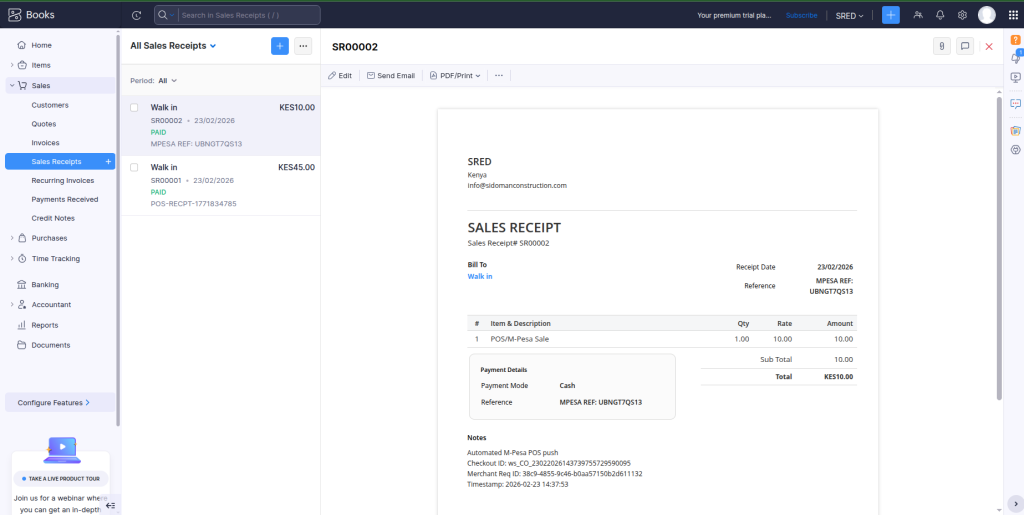
6) Check Sales receipts in Zoho Books(Sales >Sales receipts)
The sale has been synchronized with Zoho Books
Error handling
In the event that payment has not been completed, all API responses follow a consistent format.
// Success Response
{
  "success": true,
  "data": { ... }
}

// Error Response
{
  "success": false,
  "message": "Error description"
}
Learn more about error codes here
Support
For inquiries or support, contact [email protected] or +254 782 411 538.
